Rapha Health · iPhone beta

Finally stick to your protocol.
And learn what works for you.

Your labs, your wearable and how you feel, in one place, with an assistant that checks in every day and follows up when you drift.

Join the beta

2½-minute tour, with sound. iPhone beta via TestFlight.

Screens and data show Maya, a fictional demo patient.

01 · Connects the dots

Four clues that meant nothing on their own

Most results get read one test at a time. Rapha reads them together, with your wearable and your days, and looks for what they add up to.

How Rapha read Maya's bloating

  1. Organic acids test (OAT) Her yeast markers came back high.
  2. Stool test (GI-MAP) No yeast seen, so on its own it looked clear.
  3. Her check-ins Bloated most mornings, and tired.
  4. Her Oura ring Short nights before the worst days.

Together: likely yeast overgrowth, at moderate confidence. Rapha names a test that could confirm it, a GI Effects stool test with yeast culture, for Maya to discuss with her practitioner.

Five sources (stool test: no yeast seen; organic acids: yeast high; blood panel: iron low; Oura ring: short nights; check-ins: bloated, tired) joining into one card: 'What's behind Maya's bloating and tiredness', likely yeast overgrowth, moderate confidence, with a GI Effects stool test suggested to confirm.

Patterns between your wearable and your days

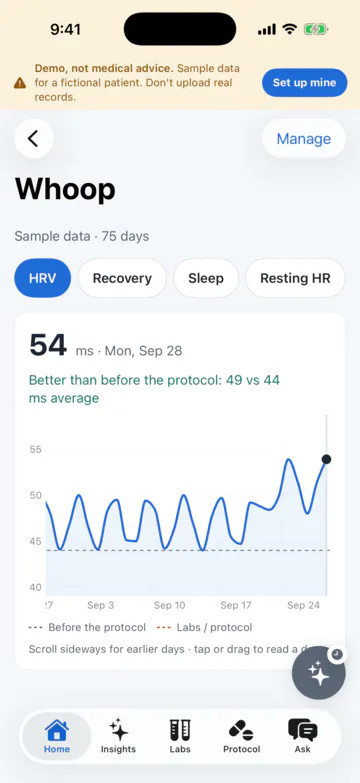
Your check-ins sit on the same timeline as your labs and your wearable data. For Maya, the tired days followed short nights, and her iron was low. Once her protocol started, Rapha could also show her HRV climbing against the months before.

It works with WHOOP, Oura, Garmin and Apple Health.

A Whoop HRV chart over 75 days with the protocol start marked: 54 ms today, 49 ms average since the protocol versus 44 before.

02 · Checks in, and follows up

It checks in every day, and notices when you don't

An insight only helps if someone keeps checking. Rapha asks every morning, and it notices when you go quiet.

A daily check-in that takes seconds

Rate your energy, sleep and digestion in a few taps, or just say it: "energy's about a 3, slept badly." Each day lands on your week strip, and on the same timeline as your labs and wearable, which is how the patterns show up.

Your week comes back as a short summary: what's improving, what isn't yet, and what to keep doing.

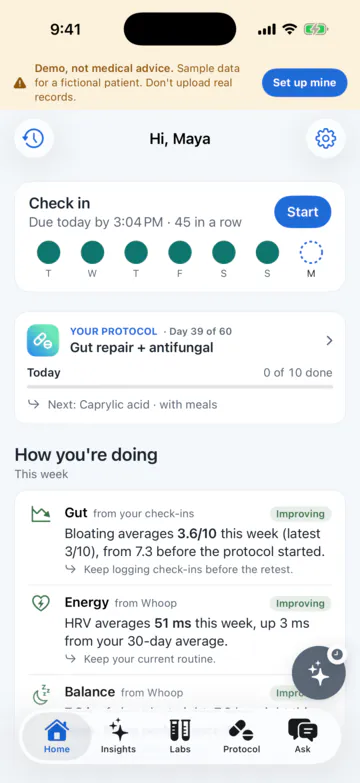
Maya's home screen: today's check-in with a week strip of completed days and a 45-day streak, today's protocol, and 'How you're doing' this week: bloating down from 7.3 to 3.6 out of 10, HRV up 3 ms.
Maya's protocol from Dr. Allen (fictional), day 39 of 60: caprylic acid for OAT yeast markers, berberine for strep overgrowth on GI-MAP, iron bisglycinate for ferritin below range, magnesium glycinate for oxalates and sleep.

A protocol with a reason for each item

Your practitioner writes the protocol. Rapha shows which result each item is for, and you tap to log what you took.

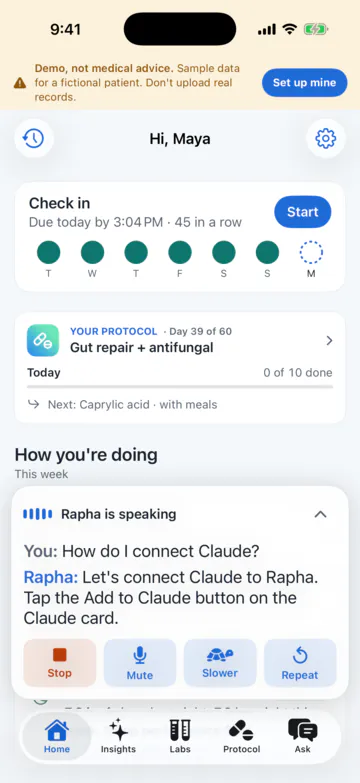
Talk to Rapha: a voice panel showing the spoken question and Rapha's answer as text, with Stop, Mute, Slower and Repeat buttons.

Tell it how you feel, out loud

Talk to Rapha like you would to a person: how you slept, what flared up, what you want to know. You hear the answer and see it on screen. Audio is never stored; only the text is saved to your chats.

03 · Who it's for

Wherever you're starting from

No tests yet?

Start with a daily check-in and your wearable

Connect Oura, WHOOP, Garmin or Apple Health and answer a few questions each morning. Rapha starts spotting patterns in how you sleep and feel, and your labs slot in whenever you get them.

Already drowning in results and supplements?

Bring everything in, and get one plan

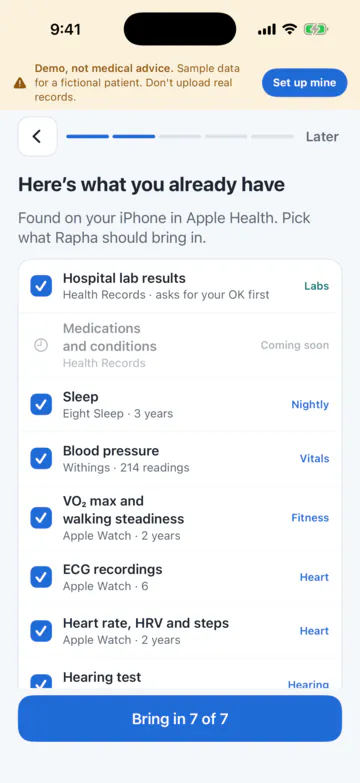
Hospital results from Apple Health, PDFs, photos, forwarded emails, even old reports in Gmail. It all lands in one place, under one plan.

'Here's what you already have': data found in Apple Health, including hospital lab results, sleep, blood pressure, VO2 max, ECG recordings and heart rate, each with a checkbox, and a 'Bring in 7 of 7' button.

04 · Why you can trust it

Every claim has a source you can check

Answers with sources

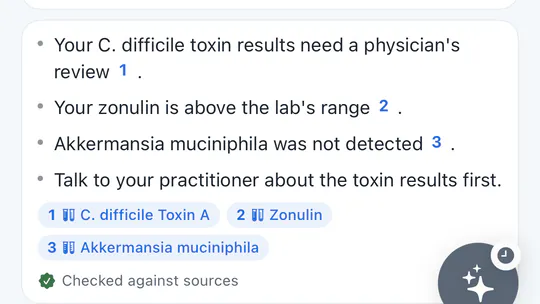
Ask anything about your results. Each point in the answer carries a numbered source: a value from your own report or a published study. Tap a number to see where it came from.

Close-up of a chat answer: 'Your C. difficile toxin results need a physician's review', 'Your zonulin is above the lab's range', 'Akkermansia muciniphila was not detected', each with a numbered source chip, and 'Checked against sources' below.

The exact line on the original report

A source from your lab opens the original PDF with the row highlighted: the value, the reference range and the lab's own flag, not a paraphrase.

A GI-MAP sample report open in the app with the C. difficile Toxin A row highlighted: 3.47e5, flagged High, range under 1.00e3.
  • Built on Claude

    Rapha's answers are written with Claude, a model made by Anthropic.

  • A curated library and your own values

    Answers draw on a curated library of medical literature and on the results in your reports, not on whatever a model remembers.

  • Checked before you see it

    Every sentence is checked against the sources it cites before the answer is shown.

  • Honest about weak evidence

    When the studies are thin, the answer says so. When it can't find a source, it tells you instead of guessing.

Privacy

  • Yours to keep or remove

    Export your data or delete your account at any time, from Settings.

  • Not for sale

    No selling your data, no advertising, and no training AI models on it.

  • Voice audio is never stored

    When you talk to Rapha, only the text transcript is saved, in your chats.

  • Not medical advice

    Rapha helps you understand your results. It doesn't diagnose, prescribe or suggest doses. Decisions about your care stay with you and your practitioner.

05 · For practitioners

Patients arrive informed. You stay in charge.

Your patients bring every result into one place and check in every day, so you can see how they're doing between visits. You write the protocol; Rapha shows the reason for each item, follows up when check-ins stop, and cites a source for every answer it gives.

The practitioner shown in the demo, Dr. Allen, is fictional.

Try Rapha with your patients

Leave your email and we'll be in touch about practitioner access.

See it for yourself

Watch Rapha connect Maya's dots in 2½ minutes.

Join the beta

Rapha tour

← → move · Space pause · M mute · Esc close
Maya and Dr. Allen are fictional.